

If Shell, SSH, and tmux all sound like different names for “terminal stuff,” the simplest way to understand them is to stop treating them as competing tools. They solve three different problems at three different layers.
Shell is where commands run. SSH is how you reach another machine. tmux is how a terminal session stays on that machine so you can leave and return.
Put them together and you get the foundation of a reliable remote AI coding workflow. That matters when the program in your terminal is not a five-second command, but Claude Code, Codex, OpenCode, a test suite, a build, or another long-running development task.
What is a Shell?
Open a terminal and you might enter git status, npm run dev, or claude to start Claude Code.
Something must read that text, interpret its syntax, find the requested program, and start it. That something is the shell.
The GNU Bash manual defines a Unix shell as both a command interpreter and a programming language. Common interactive shells include Bash, zsh, and fish.
So when you type git status, the shell interprets the command and launches Git. When you type claude, the shell starts the Claude Code process in the current environment.
The useful mental model is:
The shell is the command environment where you work.
Terminal and Shell are not the same thing
This distinction causes a lot of confusion.
Ghostty, Terminal.app, iTerm2, and similar applications are terminal emulators. Bash, zsh, and fish are shells. In the simple stack Ghostty → zsh → git status, Ghostty provides the interface, zsh reads the command, and Git is the program that eventually runs.
An easy way to remember the distinction:
- Terminal = the room.
- Shell = the command environment operating inside the room.
You can change terminal applications without changing your shell, and you can start a different shell inside the same terminal.
What is SSH?
A local shell is easy to reach because the computer is in front of you. Remote development adds another question: how do you reach a shell on a different machine?
Your code might live on:
- a Mac at home;
- a Linux development server;
- a VPS;
- a workstation in your office;
- another machine connected through a private network.
SSH provides that remote connection. SSH stands for Secure Shell. Despite the name, SSH is not the command interpreter described above; it is a network protocol for secure remote login and command execution.
The OpenSSH manual describes ssh as a remote login client for logging into and executing commands on another machine over an encrypted connection.
A basic connection is ssh alice@development-host: the laptop or phone reaches the remote Mac or server through SSH, then uses a shell on that host.
After authentication, you can interact with a shell on the remote host. SSH is not that shell; it is the secure path used to reach it.
Another useful mental model:
- SSH = the road.
- Shell = the workspace at the destination.
If you are setting up Redock for the first time, the SSH key guide explains the authentication layer separately from the terminal session itself.
What happens when SSH disconnects?
Suppose you SSH into your Mac, enter the project, and run claude directly. Claude Code starts reading the repository, modifying files, and running tests. Then you walk into an elevator and your phone loses its network connection.
The SSH client is no longer attached to that interactive terminal. Depending on the process, shell, and how it was launched, the remote process may receive a hangup and exit, or it may continue without giving you an easy way to recover the same interactive state.
That distinction barely matters for an instant command such as ls. It matters much more when an agent inspects dozens of files, refactors code, runs tests, fixes failures, and eventually waits for your approval.
The problem is not simply “SSH disconnected.” The real problem is that the work you care about was coupled to one temporary client connection.
tmux helps separate those lifecycles.
What is tmux?
tmux is a terminal multiplexer. The name sounds more complicated than the core idea.
The official tmux Getting Started guide explains that programs run inside tmux-managed terminals, while tmux and those programs can be detached from the outside terminal and later reattached from the same or another terminal.
The easiest mental model is:
tmux puts the terminal session on the host instead of making it depend on the current phone or laptop staying attached.
tmux organizes more than one terminal window
Being able to leave and return is the most important tmux capability for remote AI coding, but it is not the only one. tmux organizes a terminal workspace into a few layers:
- Server: the tmux background service on the development host that manages its sessions.
- Session: a named workspace that can be detached and reattached, often representing one project or long-running task.
- Window: a terminal page inside a session, similar to a tab, that can hold an agent, tests, or logs.
- Pane: a split region inside a window; each pane can run its own shell and program.
For example, a checkout-refactor session might keep Claude Code in one window and the test runner in another. If you need to watch the agent and a development-server log at the same time, one window can be divided into two panes.
Detach and exit are not the same operation. Detaching only removes the current phone or laptop client while the programs in the session can continue running. Exiting the final shell, killing the session, or stopping the tmux server may actually end that workspace. For a Redock mobile workflow, creating, listing, detaching, and reattaching sessions matter more than memorizing every tmux key binding.
Running Claude Code directly vs inside tmux
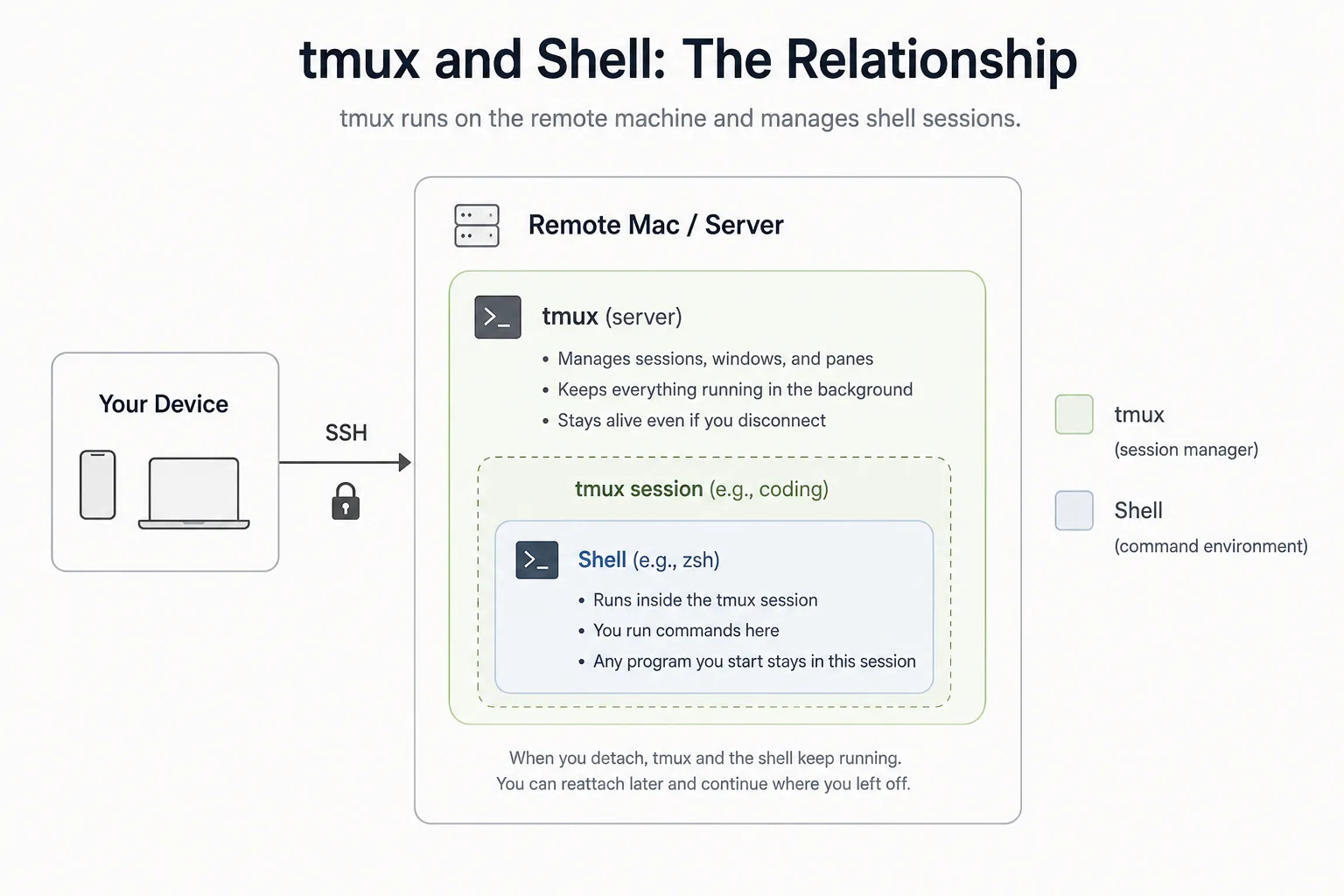
tmux is a terminal session manager on the remote host. It does not replace the shell or run Claude Code itself. It manages the terminal session that contains the shell and the agent.
If you launch claude directly in an SSH terminal, that interactive session is more closely tied to the current connection. If you enter tmux first, Claude Code is still started by the shell, but its terminal session belongs to tmux on the development host:
# Start Claude Code in the current SSH terminal
claude

# Or create or reuse a tmux session, then start Claude Code
tmux new-session -A -s coding
cd ~/projects/app
claude
Both commands start the same Claude Code. The difference is not what the agent can do, but which layer manages its terminal session. With tmux, a temporary client disconnect does not necessarily remove the host-side session you need to return to.
The host-side structure is now tmux: coding → Shell → Claude Code. The tmux session belongs to the development machine; your phone or laptop is only a client viewing and interacting with it.
What happens after the client disconnects?
The phone may lock, the app may move to the background, the network may drop temporarily, the SSH connection may close, or the device may switch between Wi-Fi, 4G, and 5G. Those events affect the client's connection path. As long as the development host, tmux server, and agent process remain healthy, the coding session can remain on the host.
Later, reconnect to the host and run tmux attach-session -t coding. You return to the existing terminal state instead of creating a new coding-agent conversation. The complete start-and-reconnect commands appear once in the practical section below.
What tmux does not guarantee
tmux separates the session from the current client connection, but it is not a backup system and does not make a process immortal.
The session still depends on:
- the development host remaining powered on and awake;
- the tmux server continuing to run;
- the coding-agent process not exiting;
- the operating system and storage remaining healthy.
If the host shuts down or the tmux server stops, the session is gone. tmux protects against a client leaving; it does not protect against every host failure.
Put Shell, SSH, and tmux into one remote connection path
After looking at each tool separately, their roles are easier to see in one real remote-development path. Imagine the project is running on a Mac at home while you are outside with only your phone:
| Layer | What it does | Easy way to remember |
|---|---|---|
| Shell | Interprets commands and starts programs | Where you work |
| SSH | Connects securely to another machine | How you get there |
| tmux | Keeps and organizes terminal sessions on that machine | How you leave and return |
| Redock | Organizes the remote layers into a mobile coding workflow | How you control it from your phone |
The phone first reaches the development host through SSH or Mosh, then attaches to a tmux session on that host. A shell runs inside one of the session's windows or panes, and that shell starts Claude Code, Codex, or OpenCode.
A title such as “Shell vs SSH vs tmux” is useful for search, but slightly misleading in practice. There is no winner. Each tool solves a different part of the same remote-terminal problem.
Once the path is clear, the next step is not another definition. It is using the stack for a coding task you can leave and later resume.
Turn the connection path into a recoverable AI coding session
Suppose Claude Code is about to refactor a checkout flow and may still be working after you leave your desk. This workflow works on a Mac, Linux host, or development server and has only two stages: start the task, then return to it later.
Start the session: connect, enter the project, and run the agent
ssh alice@development-host
cd ~/projects/checkout
tmux new-session -A -s checkout-refactor
claude
# or: codex
# or: opencode
The -A option attaches if checkout-refactor already exists; otherwise tmux creates it. The agent then uses the project directory and development environment inside that session.
Reconnect: find and attach the existing session
After reconnecting to the host, confirm the session name and attach it:
tmux list-sessions
tmux attach-session -t checkout-refactor
The first block reaches the host and starts work inside tmux. The second returns to the existing session. The shell and coding agent remain on the development host throughout.
A real remote AI coding workflow
Imagine you are working on a checkout refactor from your Mac. You enter the checkout-refactor session, launch Claude Code, and ask it to keep the public API unchanged, add regression tests for invalid coupons, and run the checkout test suite.
The agent starts reading files and running tests. You leave your desk before it finishes.
Later, your phone reconnects to the Mac through SSH or Mosh and re-enters tmux: checkout-refactor. Claude Code has completed the refactor but is waiting for a decision about one edge case. You answer from the existing terminal context, then put the phone back in your pocket.
The actual repository, dependencies, Git state, and agent process never moved to the phone. The phone controlled the development environment; it did not replace it.
That is the use case described in keeping long-running AI coding sessions alive.
Once the session stays on the host, one practical problem remains: a phone does not stay on one stable network. You may enter an elevator, leave Wi-Fi, or move between cellular networks. tmux preserves the session, but it does not improve the connection path between the phone and the host.
What Mosh adds when the phone's network changes
Mosh is a remote terminal designed for roaming and intermittent connectivity. It can improve interactive behavior when a phone moves between Wi-Fi and cellular networks. tmux still provides the host-side session you can reattach when needed.
The practical distinction is:
- SSH authenticates and provides a standard secure remote connection.
- Mosh can make an interactive mobile connection more resilient to network changes.
- tmux keeps the terminal session on the host independently of the current client.
Mosh and tmux are complementary: Mosh handles the current connection while tmux keeps the host-side session. If your phone frequently moves between networks, Redock can use Mosh as the connection mode; see the Mosh setup guide for the server and UDP requirements.
This pattern is not specific to Redock. Termius recommends tmux and Mosh for mobile AI-agent sessions, and Moshi documents tmux as a host-side workspace. The underlying tools remain standard terminal infrastructure.
At this point, SSH or Mosh together with tmux already provides remote access and session recovery. Re-entering a session with a few commands is straightforward from a desktop terminal. It feels less convenient when you are away from the computer and only want to check an agent's progress, answer a question, or add one instruction from your phone: first you must select the host, enter the project, find the session, and locate the correct terminal.
Redock makes this workflow easier to continue from a phone
Redock simplifies that part of the workflow. It organizes the host, working directory, and remote sessions as a Project, so you can return through the project context to the relevant terminal or tmux session and continue Claude Code, Codex, or OpenCode without rebuilding the connection path each time.
Redock is therefore not another shell and does not replace SSH, Mosh, or tmux. Those tools still connect the device, preserve the session, and run commands; Redock makes the combined workflow easier to find and continue from a phone:
- SSH or Mosh connects the phone to the development machine.
- tmux keeps the terminal session available on that machine.
- Shell runs commands, tools, scripts, and coding agents in the real project environment.
- Redock organizes those layers with Projects, terminal access, Actions, voice input, and visible tmux create, attach, and resume paths.
Redock connects to a development host you control. The code, dependencies, repository, shell, and agents stay in that environment.
When an agent is waiting for confirmation, the useful action may be no more than reading its current output and making one decision. Redock reduces the setup before that short interaction, especially when you move between several projects, hosts, and long-running tasks.
Redock Projects associate a host and working directory with project-specific workflow context. Its tmux support makes common creation and recovery paths visible, so the developer can think in terms of “Project → Session → Agent → Next action” instead of rebuilding “Host → Path → Session name → Command.”
The underlying session remains standard tmux on the host. A desktop terminal can attach to it later; the workflow is not locked into a mobile-only runtime.
The host still uses standard tmux sessions. See the tmux setup guide for the host configuration and the tmux feature overview for how Redock creates, enters, and resumes them.
What Redock does not replace
The limits are as important as the benefits:
- Redock does not replace the Mac, Linux host, or server where development happens.
- Redock does not move the entire development environment into a Redock cloud runtime.
- Redock does not make a sleeping or powered-off host reachable.
- tmux cannot preserve a session after its host or tmux server stops.
- Mosh cannot restore a connection while the server or required network path is unavailable.
These limits do not change the division of responsibilities: the Mac or server hosts the development environment, SSH or Mosh reaches it, tmux keeps the session, the shell runs commands and agents, and Redock provides the mobile workflow layer.
Shell, SSH, and tmux: quick answers
Is SSH a shell?
No. SSH is the secure connection mechanism used to reach another machine. After connecting, you usually interact with Bash, zsh, or another shell on the remote host. OpenSSH can also execute a remote command directly without starting an interactive login shell.
Is a terminal the same as a shell?
No. A terminal emulator provides the text input and output interface. The shell runs inside it, interprets commands, and starts programs.
Can tmux replace SSH?
No. tmux manages sessions on a machine; it does not provide network access to that machine. You still need SSH, Mosh, or another connection path.
Does tmux keep running after SSH disconnects?
A tmux session is designed to remain on the host after its client detaches, so programs inside it can continue running and the session can be reattached later. It still depends on the host and tmux server remaining alive.
Does tmux keep running if the host shuts down?
No. tmux depends on the host and tmux server. If they stop, the session stops too.
Do Claude Code or Codex require tmux?
No. They run in an ordinary terminal. tmux becomes useful when a task is long-running and you expect to disconnect, switch networks, close the client, or return from another device.
The easiest way to remember everything
If you remember only four lines, use these:
Shell = where you work.
SSH = how you get there.
tmux = how you leave and come back.
Redock = how you control that workflow from your phone.
Shell, SSH, and tmux already provide a strong foundation for remote development. AI coding agents make that foundation more valuable because one terminal session can now represent a much longer-running piece of work.
Redock does not replace the stack. It gives the stack a mobile workflow: the Mac or server keeps running the code and agents, while the phone becomes the place where you can check in, respond, and keep the task moving.