

Herdr and tmux get compared constantly because both keep terminal processes alive after a client disconnects. Internally, though, they are different tools: tmux is a general-purpose terminal multiplexer, while Herdr is a terminal workspace manager that adds Agent semantics on top of persistent terminals.
A feature-by-feature comparison makes it tempting to conclude that Herdr is "tmux with a UI" or "tmux plus Agent detection." The boundaries get much clearer once you look at how each one actually works. This article explains Herdr from the inside—PTYs, the Server/Client split, persistence, and Agent detection—and compares it with tmux layer by layer.
At a glance:
- Both tools keep processes alive by letting a background Server own the PTY after a Client detaches.
- tmux organizes general-purpose terminals; Herdr adds project Workspaces, Agent detection, status rollups, and supported Agent conversation restore.
- Neither preserves an operating-system process after its Server or Host stops. Post-restart recovery is reconstruction.
- Choose tmux for a standard, portable multiplexer; choose Herdr when several coding Agents across projects need attention-aware navigation.
This is about how the two tools work, not how to install them. For setup and a phone workflow, see What Is Herdr? and How to Run Codex on Phone.
Everything Starts with the PTY
To understand any terminal multiplexer, start with the PTY (pseudo-terminal).
When a graphical terminal runs a shell, it does not connect directly to the shell process. The kernel creates a pair of endpoints in between:
- The slave side is wired to the shell's stdin, stdout, and stderr, and becomes the controlling terminal for the shell's process group.
- The master side is held by the terminal application, which reads and writes the "screen" through it.
This explains a familiar behavior: close an ordinary terminal window and the running npm run build or coding Agent dies with it. When the master side closes, the kernel sends SIGHUP to the foreground process group, and processes exit by default.
The core trick of any multiplexer is to hand that master endpoint to a long-lived process instead of a window that comes and goes. As long as the master stays open, the foreground process never receives SIGHUP, so it does not die just because a client left.
Both tmux and Herdr are built on that mechanism. The difference appears in what the long-lived process manages above it, and what model it exposes.
Herdr's Two Layers: Server and Client
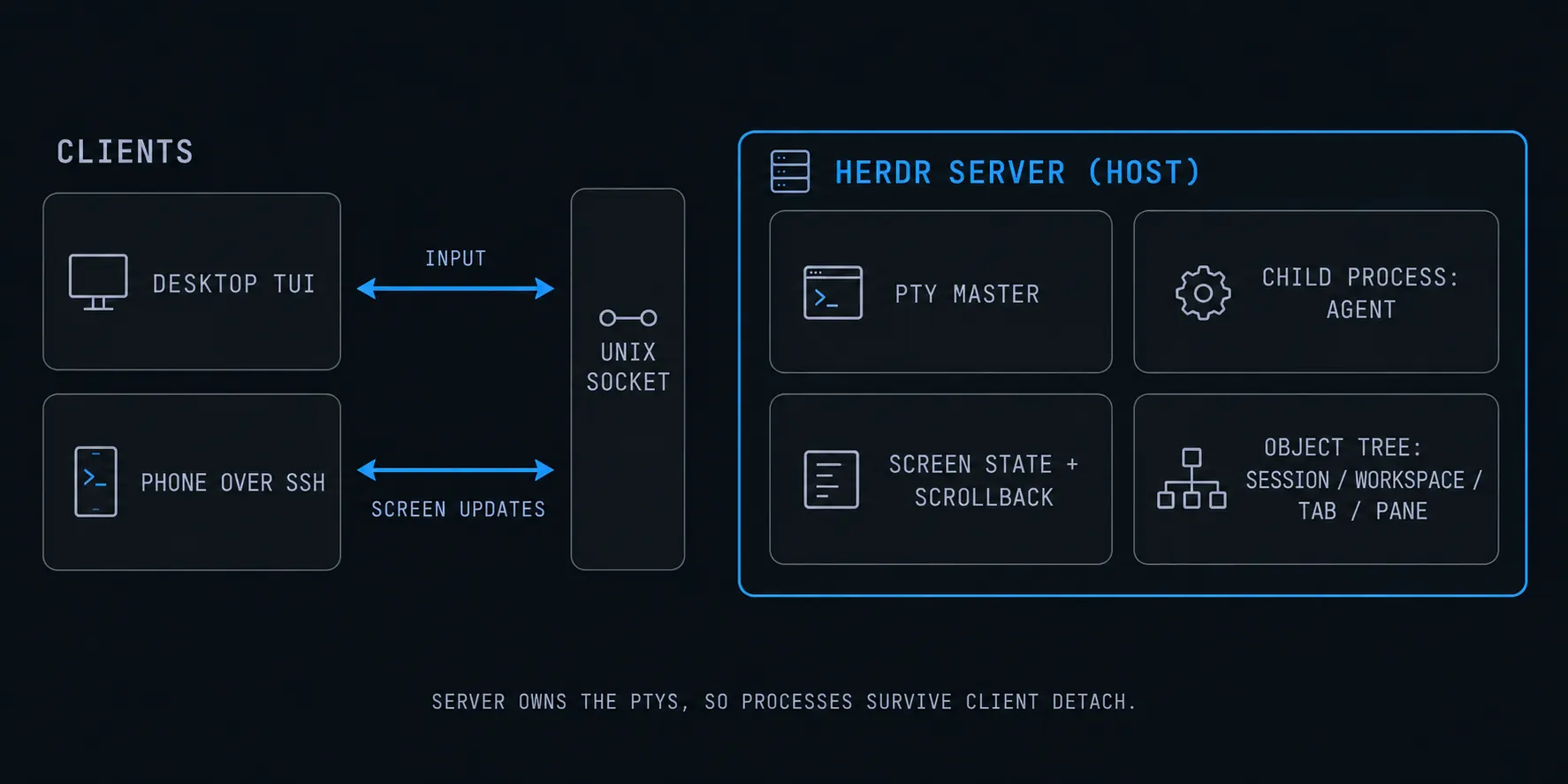
Herdr ships as a single Rust binary, but at runtime it splits into two roles.
The Server is a long-lived background process. It is responsible for:
- Holding the PTY master and child processes for every Pane.
- Keeping terminal screen state, including the visible area and scrollback.
- Maintaining the Workspace, Tab, and Pane object tree and layout.
- Tracking recognized Agents and their states.
- Listening on a local Unix domain socket, scoped to a Session namespace.
The Client is the TUI you see. It connects to the Server over that socket, forwards keystrokes and resize events, and renders the screen updates it receives.
That split has a few direct consequences:
- The owner of a Pane's process is the Server on the host, not your SSH connection or phone.
- Detach simply closes the client-server socket; the Server and every process inside it keep running.
- The same Session can be attached from multiple Clients; a desktop window and a phone over SSH see the same live state.
- The Client runs on the Host and uses the local socket; when you connect remotely, SSH carries the Client's terminal stream to your device.
Herdr's Object Model
Once the Server is clear, the rest of the model is just different levels of one tree.
| Object | Role | Roughly maps to tmux |
|---|---|---|
| Server | Background process that owns PTYs and processes | tmux server |
| Session | One Server namespace, socket, and runtime state | tmux session |
| Workspace | Container for one repository, task, or investigation | No direct equivalent |
| Tab | A layout inside a Workspace | tmux window |
| Pane | A real terminal running a shell, Agent, test, or log | tmux pane |
| Agent | A coding-agent process Herdr recognizes in a Pane | tmux does not model this |
Session versus Workspace is the easiest pair to confuse. A simple way to hold it: Session is which Server is running, Workspace is which project. One default Session can hold several project Workspaces, and named Sessions are only worth creating when you truly need a separate runtime state.
How Persistence Works: Why Processes Survive Detach
Putting the pieces together gives the full persistence story:
- The Server creates a PTY pair, forks a child, and makes the slave endpoint that child's controlling terminal.
- The Server keeps the master endpoint and continuously reads output, updating its screen model.
- When a Client detaches, only the client-server socket closes—not the master endpoint.
- With no master-close event, the kernel does not send
SIGHUP. The foreground process keeps running and its output keeps being consumed by the Server. - On the next attach, the new Client receives a snapshot of the current screen and scrollback, then joins the live output stream.
This is exactly the behavior tmux provides. At the "client disconnects, processes continue" layer, the two are the same mechanism.
The difference appears after the Server itself stops. At that point the master endpoint is gone, the old processes are gone, and no tool can bring them back. All that remains is reconstruction:
- Core tmux does not survive server death; users typically rely on plugins such as
tmux-resurrectandtmux-continuumto save layouts and commands and relaunch them. - Herdr can restore saved Workspaces, Tabs, Panes, working directory, layout, and focus. With official Integrations, it can also resume supported Agent conversations using their native Session IDs.
Both are reconstruction, not process immortality. A restored Codex or Claude Code conversation does not mean an interrupted compiler, development server, or arbitrary shell process survived a reboot.
How Agent Detection Works
Up to this point, Herdr and tmux share the same machinery. The real fork in the road is what the long-lived process understands above the master endpoint.
tmux only knows panes and a foreground command. You can query #{pane_current_command}, but that is just a process name with no task semantics: it cannot tell whether a node process is a dev server or an Agent, or whether that Agent is working or waiting for an answer.
Herdr identifies the foreground process in a Pane, then combines several signals for supported Agents:
- Foreground process: determine which Agent binary is running in the Pane.
- Lifecycle hooks: the Agent or a shell integration reports events at key moments.
- Screen snapshot: match the most recent bottom-of-screen output against known prompt shapes in a detection manifest.
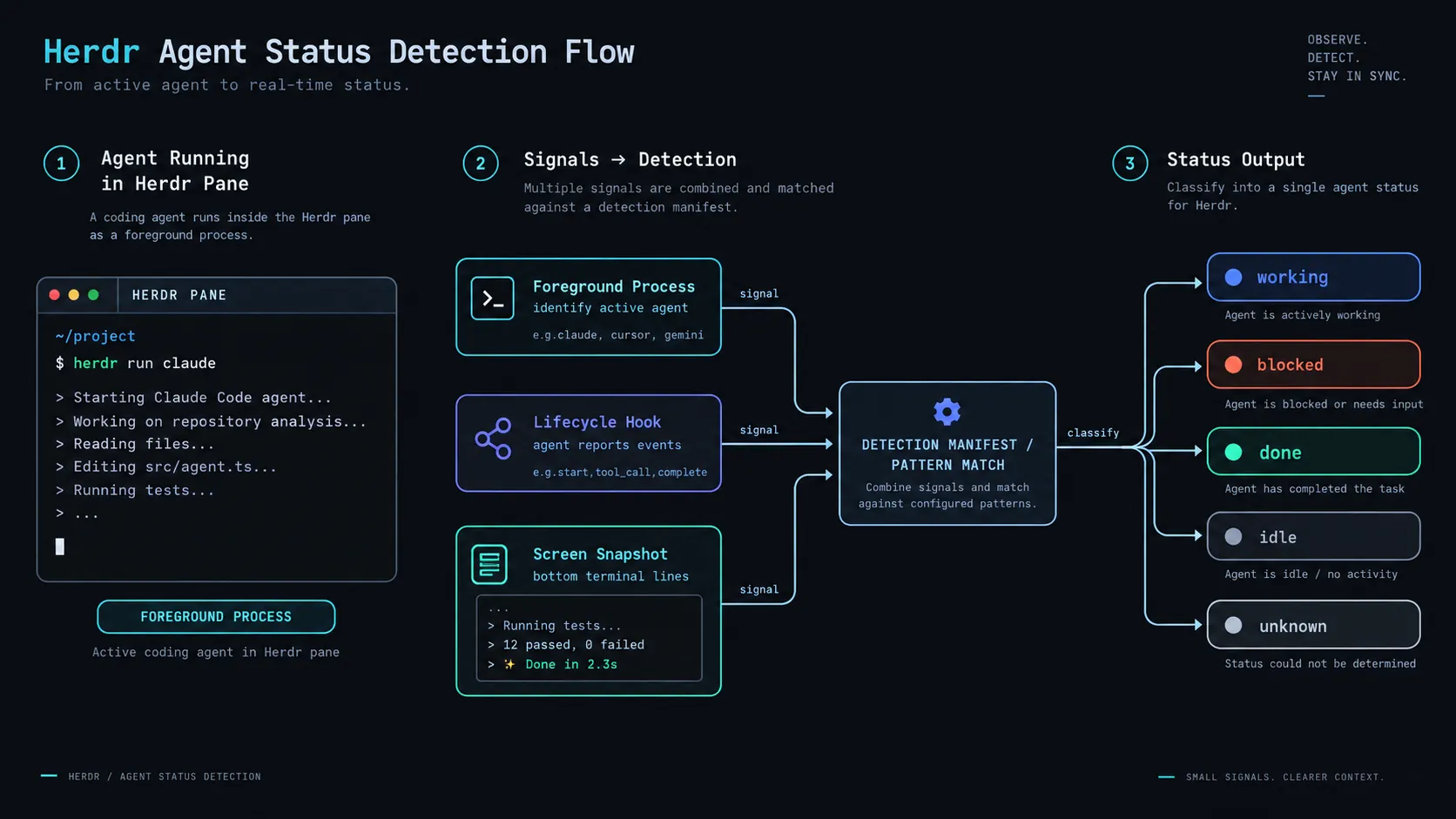
Detection resolves to a small set of states:
| State | Meaning |
|---|---|
working |
The Agent is actively running |
blocked |
A known approval, question, or permission UI is waiting for input |
done |
Background work finished and has not been viewed |
idle |
The Agent is ready or finished and has already been seen |
unknown |
An Agent was detected, but its state cannot be classified confidently |
Herdr's blocked detection is intentionally conservative. If a new version of an Agent shows an unrecognized prompt, it may report idle rather than blocked. That affects the status display only; it never causes Herdr to approve an action or send destructive input. Always read the actual Pane before approving.
Turning State into an Attention Queue
Agent detection is only the input. What separates Herdr from tmux is that those states roll up the object tree: when a Pane becomes blocked, its Tab and Workspace visibly need attention; done signals a result worth reviewing.
So a set of Agents across several projects is no longer a row of unlabeled terminal names. It becomes a project-organized attention queue. That is why Herdr describes itself as a terminal workspace manager rather than a multiplexer: it manages which project needs you, not how many terminals you have.
How Native Agent Session Restore Works
An official Integration records native Session identity in the Agent's own hook configuration. Most Agents already support resuming a conversation from their own session ID (a --resume-style flow); the Integration simply hands that ID to Herdr.
After a Server restart, Herdr can relaunch the Agent with the recorded Session ID and restore the conversation context. The important caveat: this is a new process. What is restored is the Agent conversation, not the original operating-system process. An interrupted build, log stream, or local service does not continue because of it.
tmux's Architecture and Object Model
tmux also uses a client-server model. The first tmux invocation starts a background server and listens on a Unix socket such as /tmp/tmux-<uid>/default; later tmux commands are really clients sending commands to that server.
Its hierarchy is Server → Session → Window → Pane. Each Pane is likewise a process backed by a PTY. Interaction is a prefix key (default Ctrl+b) plus a command language:
tmux new -s work       # create a session
tmux ls                # list sessions
tmux attach -t work    # reattach
tmux send-keys -t work 'npm test' Enter
A few tmux-specific mechanisms are worth understanding on their own:
- Command language: almost everything is scriptable.
send-keys,split-window, andselect-panecan be driven from any program. - Control mode (
tmux -CC): output becomes a machine-readable event stream, which is how apps like iTerm2 map tmux sessions onto native windows. - Config and plugins:
.tmux.conf, hooks,run-shell, and community plugins provide deep customization.
Being mature, portable, and dependency-light is why tmux is installed almost everywhere by default.
Herdr vs tmux, Layer by Layer
Start with the architecture:
| Layer | tmux | Herdr |
|---|---|---|
| Runtime model | Client / Server + socket | Client / Server + socket |
| Terminal mechanism | PTY + process group | PTY + process group |
| Object model | Session / Window / Pane | Session / Workspace / Tab / Pane / Agent |
| Interaction | Prefix key + command language | Sidebar + attention queue + shortcuts |
| Cross-client persistence | Detach / reattach | Detach / reattach |
| Agent semantics | None | Detection, state, rollups, native restore |
| Extensibility | Hooks, plugins, control mode | CLI, socket API, integrations, plugins |
And the practical leanings:
| Choose | When it fits |
|---|---|
| tmux | A few persistent terminals; standard, portable, scriptable; an existing tmux workflow; no need for Agent semantics |
| Herdr | Several coding Agents at once; project Workspaces, visible Agent status, direct Agent attach, APIs, and native session restore |
In one line: tmux manages terminals; Herdr manages Agents across projects. When a terminal is just a terminal, tmux is simpler. When that terminal is running coding Agents from several projects, Herdr's extra layer starts to pay off.
Nesting: What to Avoid
The two can coexist, but direction matters.
- Running Herdr inside tmux as the outer environment is generally fine.
- Do not wrap Codex or Claude Code in another tmux session inside a Herdr Pane. Herdr then sees
tmuxas the foreground process, not the Agent behind it, and detection breaks. - SSH → tmux → Agent is fine, because tmux needs no Agent detection.
- When running two persistence layers, be clear about which one restores. Letting Herdr own the Agent Workspace and leaving tmux for general terminal work is usually the cleaner split.
For a focused tmux phone setup, see How to Run Claude Code on Phone. For the introductory version of the comparison, see What Is Herdr?.
Where Redock Fits
Redock does not change how Herdr or tmux works internally. It handles the part where you return to those persistence layers from a phone.
Plain SSH plus herdr already makes the workflow function. Friction shows up once the phone becomes a regular control surface: selecting the right Host, finding the repository entry point, re-entering the Session, and repeatedly running Git, test, build, and log commands.
Redock integrates Session persistence—Herdr or tmux—into a Host and Project workflow: the Host stores the connection, the Project binds the repository directory, and Actions cover the repeatable commands around an Agent while keeping their output as Runs. Herdr still owns the persistent terminal workspace on the host; Redock makes it easier to get back to the right place from a phone.
For the phone-side controls, see Using Herdr Inside Redock: Chat View and Pane Switching.
The Boundaries at the Architecture Level
- No compute: neither Herdr nor tmux can make a sleeping or powered-off machine keep working.
- No process immortality: when the Server stops, the old processes are gone and can only be reconstructed.
- Agent detection is heuristic: screen matching can lag behind an Agent UI change, and
blockedappears only for known prompts. - No conflict resolution: multiple Agents editing in parallel still need branch or worktree isolation.
- Security is still yours: limit SSH access, prefer keys, protect the host account, and treat Pane history as sensitive.
FAQ
Do Herdr and tmux work the same way?
At the base layer, very similarly. Both use a client-server model, a Unix socket, and PTYs so processes survive a detach. They diverge above that: tmux manages sessions, windows, and panes, while Herdr adds Workspaces and Agent detection.
Can Herdr replace tmux?
In an Agent-heavy workflow, yes. For a small number of persistent terminals, tmux is simpler, more standard, and more portable. Herdr adds Workspaces, Agent status rollups, APIs, plugins, and native Agent restore.
Why do processes survive after I detach?
Because the PTY master endpoint is held by the Server on the host, not by your client. Detaching only closes the client-server socket, so the master stays open and the kernel never sends SIGHUP to the foreground process.
Why not run an Agent inside tmux inside Herdr?
Herdr would see tmux as the foreground process and miss the Agent behind it, so it cannot detect state or perform native session restore.
Which Agents does Herdr support?
Herdr automatically detects many common Agents, including Claude Code, Codex, OpenCode, Pi, GitHub Copilot CLI, Cursor Agent CLI, Devin CLI, Grok CLI, Kimi Code CLI, and Qwen Code. Other terminal programs still run, just without full Agent state.
Conclusion
At the terminal-mechanics layer, Herdr and tmux are the same kind of tool: both hand the PTY master to a background process so work is no longer tied to a single connection. The divergence happens above that—tmux abstracts it into sessions, windows, and panes; Herdr abstracts it into project Workspaces and Agent state.
Once that is clear, the choice gets simple: reach for tmux when you want a dependable multiplexer, and reach for Herdr when you want Agents across several projects to stay visible and tell you which one needs you.