

If you installed Herdr a few months ago, herdr probably means a sidebar, project workspaces, and several coding agents running in terminal panes. Visit the official homepage today and you will find a desktop app built on something called herdr-core.
The practical distinction is that Herdr TUI has its own server; herdr-core is a separate terminal runtime, controlled with hc, that powers the new desktop app. An agent started in one does not appear in the other. This is explicit in the official Herdr FAQ, and it matters before you change an existing remote workflow.
Research checked November 4, 2026. This article compares published documentation and release notes; it is not a hands-on performance benchmark.
Herdr TUI vs herdr-core at a glance
The two runtime stacks are separate, even when installed on the same machine:
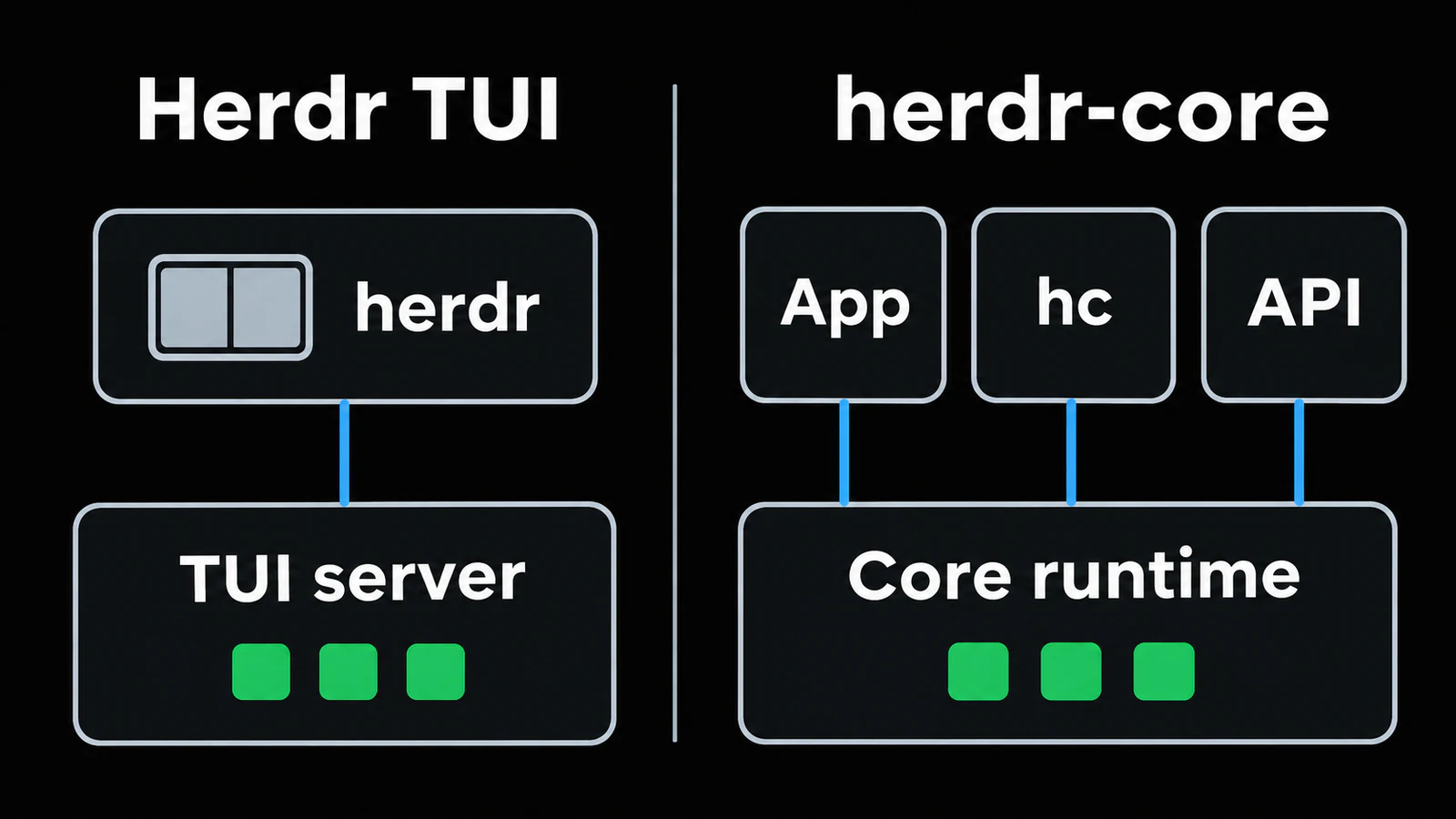
| Question | Herdr TUI | herdr-core |
|---|---|---|
| What do I start? | herdr, the original terminal application |
hc, the headless runtime's CLI |
| Where is the interface? | A TUI with workspaces, tabs, panes, and an agent sidebar | Your shell, the new Herdr app, or a client using the API |
| Who owns the terminals? | The TUI's own background server | The separate Core runtime |
| How is agent status obtained? | Screen detection and agent/integration reports | Programs report status through OSC 7501 |
| Can I reconnect remotely? | Attach to the TUI on the host over SSH | Use hc on the host, or Core's SSH machine support |
| Do their running agents appear together? | No | No |
Sources: Herdr TUI, TUI agent detection, and the Core overview.
Which versions does this comparison cover?
The latest stable TUI release listed on GitHub when checked was v0.9.5, released October 14, 2026. One relevant fix is easy to miss: Codex status returned to screen detection, and the notes tell existing users to reinstall the Codex integration. Older explanations that describe Codex turn hooks as the current default need that qualification.
For Core, the latest dated entry in its official changelog was 0.1.17, November 2, 2026. Its macOS fix separates Core from the app so quitting the app does not stop agents when background execution permission is unavailable; already-running agents receive that fix when next started. This is a changelog version, not a TUI version or a desktop-app version.
That is also why a version number alone is insufficient. Record whether you are updating TUI, Core, or the app, then read that component's notes.
From a terminal workspace to a reusable runtime
Herdr TUI gives a person a complete way to organize agent work: choose a workspace, arrange panes, watch status, and enter whichever terminal needs attention. Its server and interface were designed together around that workflow. You can use it without building an interface or deciding how a terminal should appear in an app.
Core exposes a lower-level foundation. The API documentation describes terminal requests, attachment streams, and events; hc schema returns the OpenRPC description. A desktop app, editor panel, or other client can arrange those capabilities differently while leaving terminal execution on the host.
This distinction changes what you evaluate. With the TUI, the question is whether its workspace and navigation model fit your day. With Core, it is also whether the CLI and client you choose give you enough context to use that runtime comfortably. A capable backend does not by itself provide a project sidebar, a good phone keyboard, or a readable conversation view.
There is an important architectural detail underneath that separation. Core's security and runtime documentation says holder processes own the terminals. The Core process can be restarted or updated while holders keep programs alive. Conceptually, the layers are:
| Layer | Herdr TUI | herdr-core |
|---|---|---|
| Access and presentation | The attached TUI client | hc, the desktop app, or another API client |
| Coordination | TUI server and its workspace model | Core's terminal, machine, status, and event API |
| Live terminal ownership | Server-owned pane processes | Holder processes keeping terminals alive |
This is why “the window closed,” “the coordinator restarted,” and “the execution host rebooted” should never be treated as the same failure. The earlier Herdr architecture article discusses the original TUI; its server model should not simply be copied into an explanation of Core.
A separate runtime changes what “switching clients” means
Think of a client as a way to look at work and a runtime as the place keeping that work alive. Different clients can share work only when they address the same runtime and its objects.
In this case, replacing a TUI window with the new desktop app does not reconnect you to the old server. The official FAQ says their agents are separate. A missing agent in the new app can therefore be a runtime mismatch rather than a failed process.
For an existing setup, write down three things before experimenting:
- Which machine runs the agent?
- Was that terminal started through
herdrorhc? - Which command or client will reconnect to it?
Keep long-running work in its current environment while testing the other stack with a disposable task. Move a real task at a deliberate stopping point, keeping the repository state and the agent's own conversation reference if needed. Do not assume the two products provide a shared session registry or automatic migration.
Agent detection: compatibility rules versus explicit reports
The TUI can recognize supported agents from their foreground processes and visible terminal state; integrations or agent-provided reports can supply state instead. Its detection documentation also explains the limitation: an unfamiliar approval prompt can fall back to idle. The sidebar is useful context, but you should read the actual prompt before responding.
Core deliberately avoids guessing from screen contents. Its status model uses OSC 7501, the Program Status Protocol. A program that does not emit the protocol can still run, but it will not acquire rich status merely by being placed in Core.
Our reading of that tradeoff: the TUI can accommodate agents through maintained detection rules, while Core makes status reporting an explicit interface for programs and clients. Neither approach makes a status label a substitute for reviewing what an agent is asking you to do.
Interestingly, Superlogical's Rex also documents OSC 7501. Shared status vocabulary does not imply shared sessions, shared authentication, or interchangeable client APIs.
Agent coordination becomes more explicit in Core
Running several agents in split panes is only the beginning of parallel work. Someone still has to assign a bounded task, know which terminal belongs to it, collect the result, and decide when the helper should stop.
Core's agent workflow gives those actions names: launch with hc run, send a follow-up with hc send, inspect with hc read, and wait with hc wait. An agent launched from inside an hc terminal becomes a child of that terminal. The parent receives notes when its child needs attention or ends; children normally end with their parent unless launched with --outlive-parent.
That lifecycle is useful for a temporary reviewer: the review belongs to the implementation task and can be cleaned up with it. A development server has different expectations. If it should remain available after the assigning agent exits, decide that explicitly rather than assuming “background” means independent forever.
Core also supports agent templates: a Markdown file combines an installed command with reusable role instructions. A reviewer role can say which files to inspect and how to report findings, so each assignment supplies only its scope. Templates are a convenience for starting agents; their instructions do not enforce a filesystem sandbox or grant a program status support.
Readiness matters as much as launching. The template documentation says the default waits for a status report before delivering the opening message. An older agent or a startup trust dialog can interrupt that path. Read the returned result and the actual terminal before sending the task again; a second send can otherwise land in the wrong interaction.
Our practical recommendation is to start with one implementation agent and one reviewer, not a large pool. Give the reviewer a clear read-only task, keep a human review step, and isolate working directories when helpers will edit. A runtime can coordinate terminals, but Git branches, worktrees, and review discipline still determine how concurrent changes come together.
Disconnect, update, and reboot are different events
For a phone workflow, the most useful guarantee is simple: leaving the client should not end the host-side task. Both stacks separate the terminal's lifetime from an attached viewer.
What happens next depends on which process stopped:
- TUI: the restore documentation distinguishes live detach from rebuilding saved layouts and resuming eligible agent conversations through integrations. Reconstructed conversations are new processes.
- Core: its supported update/restart path can preserve programs while their holders remain alive. When the terminal's program really is lost, the README describes
--keeprecovery into a fresh shell, without rerunning the task. The desktop FAQ likewise makes clear that a reboot does not automatically restart agents or resume their work.
| Event | What to expect |
|---|---|
| Phone loses SSH or a viewer detaches | Reconnect to the existing runtime while it and the host remain alive |
| TUI server stops | Old pane processes end; layout and eligible conversations can be reconstructed |
| Core is updated through its supported path | Holders can keep the original programs running through the coordinator restart |
| Host reboots, or the processes owning the terminals are lost | Original programs are gone; apply that stack's recovery behavior |
For example, restoring the folder and terminal after a reboot does not mean a half-finished database migration or test suite continued in the background. Check the command's own result and checkpoints before starting it again. Agent conversation recovery is similarly distinct from recovering every command the agent launched.
An older Console review is useful context for why developers liked the original TUI: persistent agent sessions and SSH access. It predates the Core split. Its warning about experimental live handoff should be read alongside the current TUI restore documentation, which still describes handoff as opt-in and experimental.
The operational rule remains the same: put ongoing work on a machine that stays awake. A disconnected phone is fine; a sleeping execution host cannot continue a build.
Try the command for the runtime you actually use
Install the original TUI on the development host using the TUI installation instructions:
curl -fsSL https://herdr.dev/install.sh | sh
cd ~/projects/your-app
herdr
Start your usual agent inside a pane. Detach with Ctrl+B, then q; reconnect to that host and run herdr again.
For a separate Core experiment, the official README documents this installer and command family:
curl -fsSL https://releases.herdr.dev/core/install.sh | sh
cd ~/projects/your-app
hc run --bg --name review codex
hc ls
hc read review --lines 60
hc attach review
Run this example from a normal host shell. In the attached Core terminal, Ctrl+\ detaches. Installing Core alone does not install the desktop interface, and running herdr will not attach to review.
One host, or a list of machines?
There are two useful ways to reach remote Core work. You can SSH to the execution host and use its local hc, or register that host with Core on another machine. In the second case, your local Core combines terminal lists while the remote Core keeps the programs and their files on the remote host.
The machine guide documents a flow like this, assuming the destination has Core and SSH access is already working:
hc machine add you@development-host --name workbox
hc machine ls
hc run --bg --on workbox --cwd /srv/app --name tests npm test
hc read workbox/tests --lines 80
hc attach workbox/tests
Replace /srv/app with the real remote repository directory, and use the address returned by your run. Explicit directories are particularly helpful when the same project name exists on several machines. Losing the connection to workbox does not move the task to your laptop or stop the remote host from executing it.
For a person managing a laptop, workstation, and server, this offers one place to discover remote work. For a quick phone visit to one machine, direct SSH can remain the shorter path. Neither path changes where the code, credentials, or build tools need to be installed.
The trust model is worth understanding before building a client. Core's API operates with the host account's command and file access, and separate Core sessions organize state rather than isolate permissions. Keep that API behind the documented local or SSH access path. An agent template is a set of instructions, not a separate operating-system user.
What a custom Core client actually has to do
An open API makes another interface possible; it does not make all interfaces equivalent. The protocol documentation separates request/response calls, live terminal streams, and event notifications. A client that only lists terminal names is doing much less than one that attaches, forwards input, resizes correctly, and keeps its display in sync.
That distinction becomes visible on a phone. Rotating the device changes the terminal width. Returning from the background requires rediscovering current state. A status change needs to lead to the correct terminal rather than a similarly named task on another machine. Good touch controls and deliberate input handling are client work on top of the runtime.
It also explains why a terminal API is not automatically a structured conversation API. Terminal output contains rendering and interaction details; showing an agent's messages as a clean chat requires understanding the relevant conversation data as well. Keep runtime control, terminal rendering, and conversation presentation separate when evaluating an integration.
Core currently labels its API as preview. Its documented compatibility rules are useful signals for client builders, but an integration should still check the running server's schema and test reconnect, input, and resize behavior against the versions it supports.
A practical migration plan for existing TUI users
You do not need to move every project to learn whether Core is useful. A staged comparison gives you a clearer result:
- Record the working TUI setup. Note the host, repository paths, workspace names, agent versions, and installed integrations. Keep an entry point that still reaches the current server.
- Choose a small task for Core. A focused review or a disposable test run is easier to evaluate than a long task already carrying important context.
- Test the full return path. Start the task, detach, reconnect from another terminal or phone, then find it again by its returned address.
- Check status with your actual agent. Seeing its terminal and receiving its OSC 7501 reports are separate capabilities. Exercise a completed task and a genuine request for input.
- Check the surrounding workflow. Find the diff, read test output, identify the repository, and confirm how helpers end. These steps determine whether the new setup saves time.
- Move a real task at a stopping point. Preserve its agent-native conversation reference when appropriate and start it deliberately in the new runtime. Keep the old workspace until the replacement path is comfortable.
This makes the decision less about which project is newer and more about where you encounter friction. A developer who already navigates the TUI fluently may gain more from better project entry points. Someone building a custom interface or delegating work across machines may find Core's explicit runtime surface more valuable.
Using either stack from a phone
The network path and the runtime choice are separate decisions. First establish SSH access to the machine that owns the terminal; then attach using the corresponding CLI:
ssh you@development-host

# For an existing TUI workspace:
herdr

# Alternatively, for a terminal already started in Core:
hc ls
hc attach review
The host continues to own the terminal processes while the phone acts as the access device:
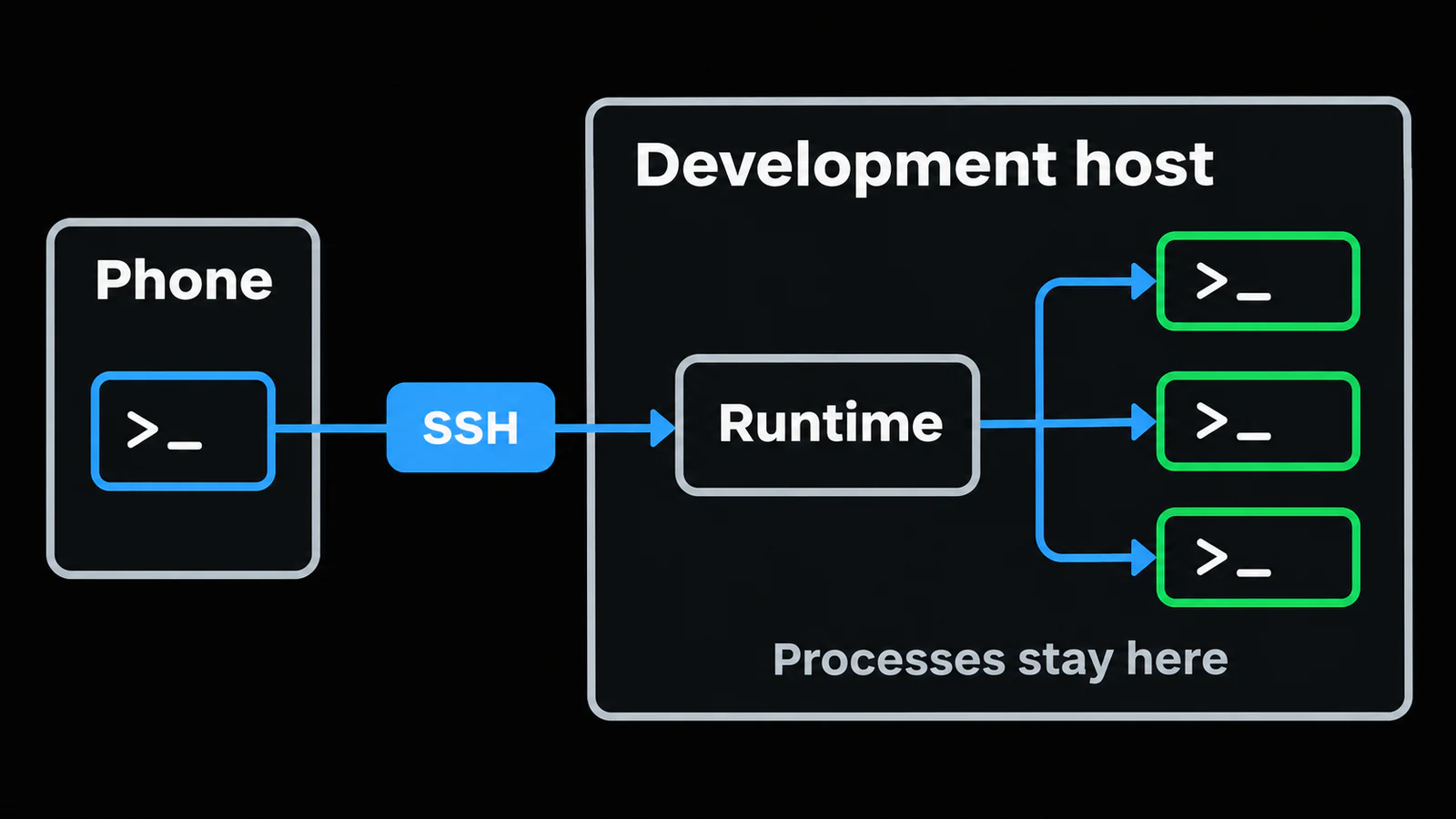
In Redock, the documented Herdr session-persistence option, workspace panel, and pane-switching workflow refer to the TUI integration. See Using Herdr Inside Redock. Do not assume those native controls operate Core's different objects and API.
You can use an ordinary Redock SSH terminal to run host-side hc commands. That is terminal access, not a claim of native Core integration. A Project can retain the host and repository context; reusable Actions can cover surrounding Git, test, and build checks. For access outside the local network, start with the Tailscale guide.
For a useful mobile check-in, decide what you need before opening a terminal. If the goal is to answer a blocked agent, go directly to that agent's runtime and read its current prompt. If the goal is to confirm a build, inspect the named test terminal or a saved Action result. If the goal is to review changes, start from the Project's repository context and examine the diff.
This keeps the phone session short while preserving context for later review. Persistence answers “is the work still there?” The host, project entry point, and client controls answer “can I get back to the right work quickly?” Both are necessary for a comfortable mobile coding workflow.
FAQ
Is herdr-core the new name for Herdr TUI?
No. They are separate programs with separate servers. The original terminal interface remains available as Herdr TUI, while Core powers the new desktop app and exposes the hc CLI.
Will my TUI agents appear in the new Herdr app?
No. The official FAQ explicitly says the two do not share agents. Check which runtime started the terminal before looking for it in another client.
Which should I choose for an existing Redock setup?
Keep the TUI path if you rely on Redock's documented Herdr workspace controls. Evaluate Core separately if you need its runtime API or the new desktop app. Ordinary SSH can reach either host-side CLI.
Does reconnecting resume a task after a reboot?
Reattaching to a living terminal and recovering after a reboot are different operations. Core's supported updates can retain live programs through holder processes, but a reboot loses the original processes. TUI can resume eligible agent conversations; Core's documented recovery returns kept terminals to fresh shells rather than rerunning the old task.
Sources and further reading
- Herdr app FAQ: separate runtimes and restart behavior
- Herdr TUI v0.9.5 release notes
- herdr-core changelog
- herdr-core README and agent manual
- Core machines and remote work
- Core agent templates
- Core API and terminal streams
- Core runtime ownership and trust model
- TUI agent detection and session restore
- Console's original TUI review
- What Is Herdr?
- How Herdr Works, Compared with tmux