 vs
vs
Redock vs Claude Code Remote Control
Claude Code Remote Control is the shortest path from the Claude app to a local Claude Code session. Redock stays agent-agnostic and keeps a full remote shell at the center.
01
Product introduction
Claude Code Remote Control connects claude.ai/code or the Claude mobile app to Claude Code running on your own machine. The filesystem, MCP servers, tools, and project configuration remain local while the conversation stays synchronized across terminal, browser, and phone. Redock also leaves execution on your machine, but reaches it through SSH or Mosh and treats the complete terminal, tmux session, Project, Actions, Runs, and Activity as the workspace.
02
The short version
Choose Claude Code Remote Control when Claude Code is your primary agent and you want its official conversation UI, remote approvals, synchronized messages, and local MCP or tool context without setting up SSH. Choose Redock when the phone must also be a real terminal, when you switch among agents and shell tools, or when Projects, tmux, Actions, Runs, and Activity should organize the whole development loop.
03
Core positioning difference
Choose between the native remote surface for Claude Code and a broader terminal workflow that can host Claude Code, Codex, OpenCode, and ordinary shell tools.
A polished, first-party Claude Code conversation with remote approvals, local context, and almost no network configuration.
Full-shell access, agent choice, explicit tmux continuity, reusable developer Actions, and saved command Runs.
04
Workflow comparison
The biggest difference appears in what each product treats as the primary unit of work.
| Capability | Redock | Claude Code Remote Control |
|---|---|---|
| Starting point | Open a Project or saved Action | Open or start a Claude Code remote session |
| Execution boundary | Any terminal program on the host | Claude Code process on the host |
| Remote transport | SSH or Mosh | Anthropic relay over outbound HTTPS |
| Session continuity | tmux session survives the client | Claude Code process and remote session stay running |
| Repeatable non-agent tasks | Named Actions with saved Runs | Ask Claude or return to the local shell |
05
Feature comparison
This table includes both advantages and limitations. Redock capabilities marked “Not included” are shown explicitly so the decision does not depend on a one-sided feature count.
| Capability | Redock | Claude Code Remote Control |
|---|---|---|
| Remote Claude Code control | Built in | Built in |
| First-party Claude conversation UI | Not included | Built in |
| Full interactive terminal | Built in | Not included |
| Local tools and MCP servers | Built in | Built in |
| Other coding agents | Built in | Not included |
| SSH / Mosh access | Built in | Not included |
| Visible tmux workflow | Built in | Not included |
| Reusable developer Actions | Built in | Not included |
| Saved non-agent Run output | Built in | Not included |
| No inbound ports required | Manual | Built in |
| Terminal/mobile message sync | Partial | Built in |
| Staged voice requirements | Built in | Partial |
06
Pricing comparison
The products attach cost to different layers. Remote Control is part of eligible Claude subscriptions and uses Claude Code allowance. Redock is a separate mobile workbench that connects to tools and model subscriptions already installed on your host.
| Plan dimension | Redock | Claude Code Remote Control |
|---|---|---|
| App access | Free tier plus optional upgrades | Included with eligible Claude plans |
| Model usage | Bring the agent setup on your host | Uses the signed-in Claude plan |
| API-key-only login | Supported by configured host tools | Not supported for Remote Control |
| Team controls | Personal development workflow | Team and Enterprise admin controls |
| Infrastructure | Your SSH/Mosh host | Your machine plus Anthropic relay |
Plan eligibility, usage limits, and App Store prices can change. Check the official Remote Control documentation and current purchase screens before deciding.
07
A native agent window versus a complete shell
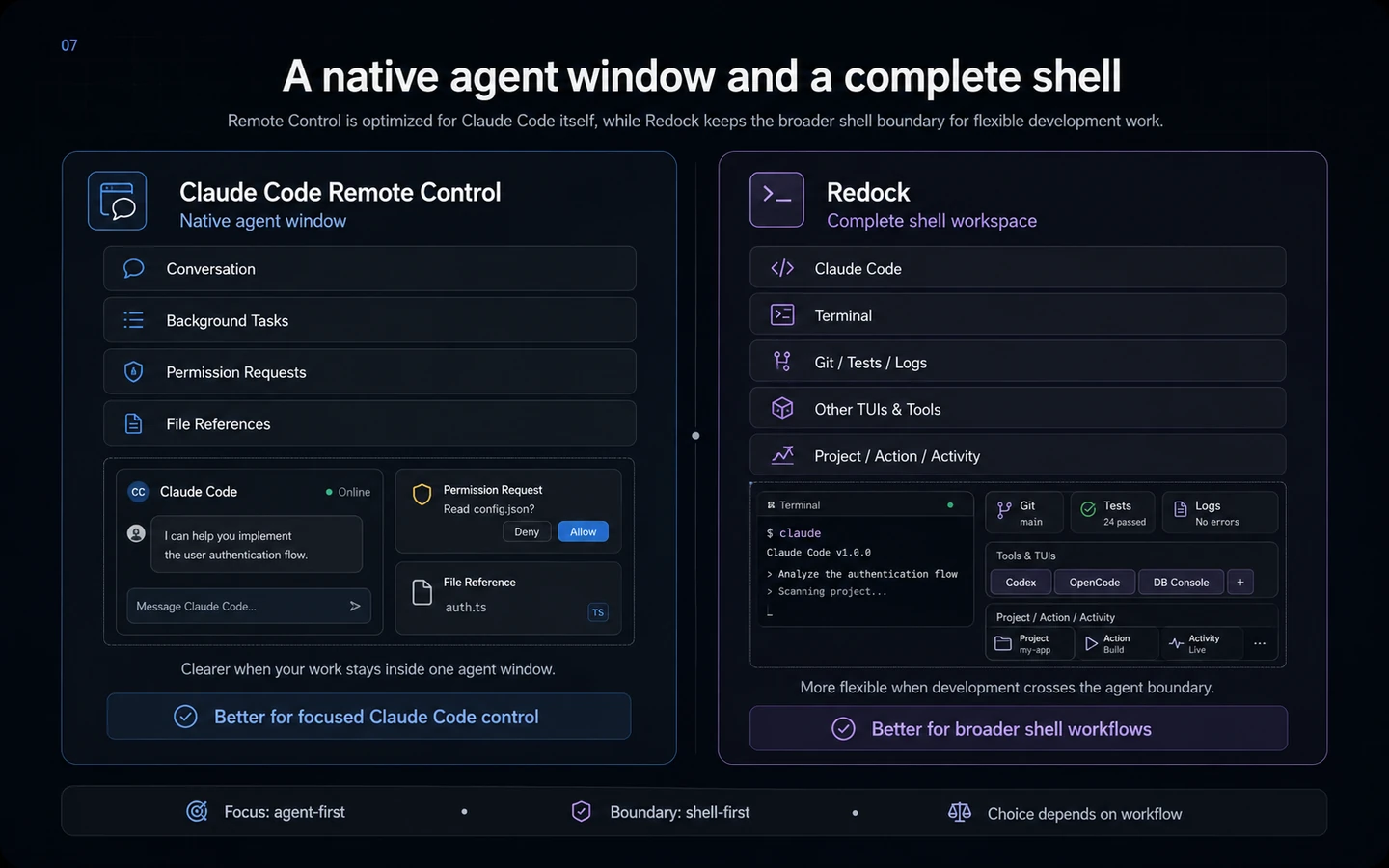
Remote Control understands Claude Code directly. It presents the conversation, background work, permission requests, and file references in an interface designed for the agent rather than rendering terminal escape sequences on a small screen.
Redock preserves a broader boundary. Claude Code runs inside a normal terminal alongside Codex, OpenCode, Git, test runners, log viewers, database consoles, and any other installed TUI. You can interrupt the agent, execute an exact command, inspect the environment, and return without changing remote-access models.
The native surface is clearer for one agent; the full shell is more flexible when development regularly crosses the agent boundary.
08
Outbound relay simplicity versus standard remote access
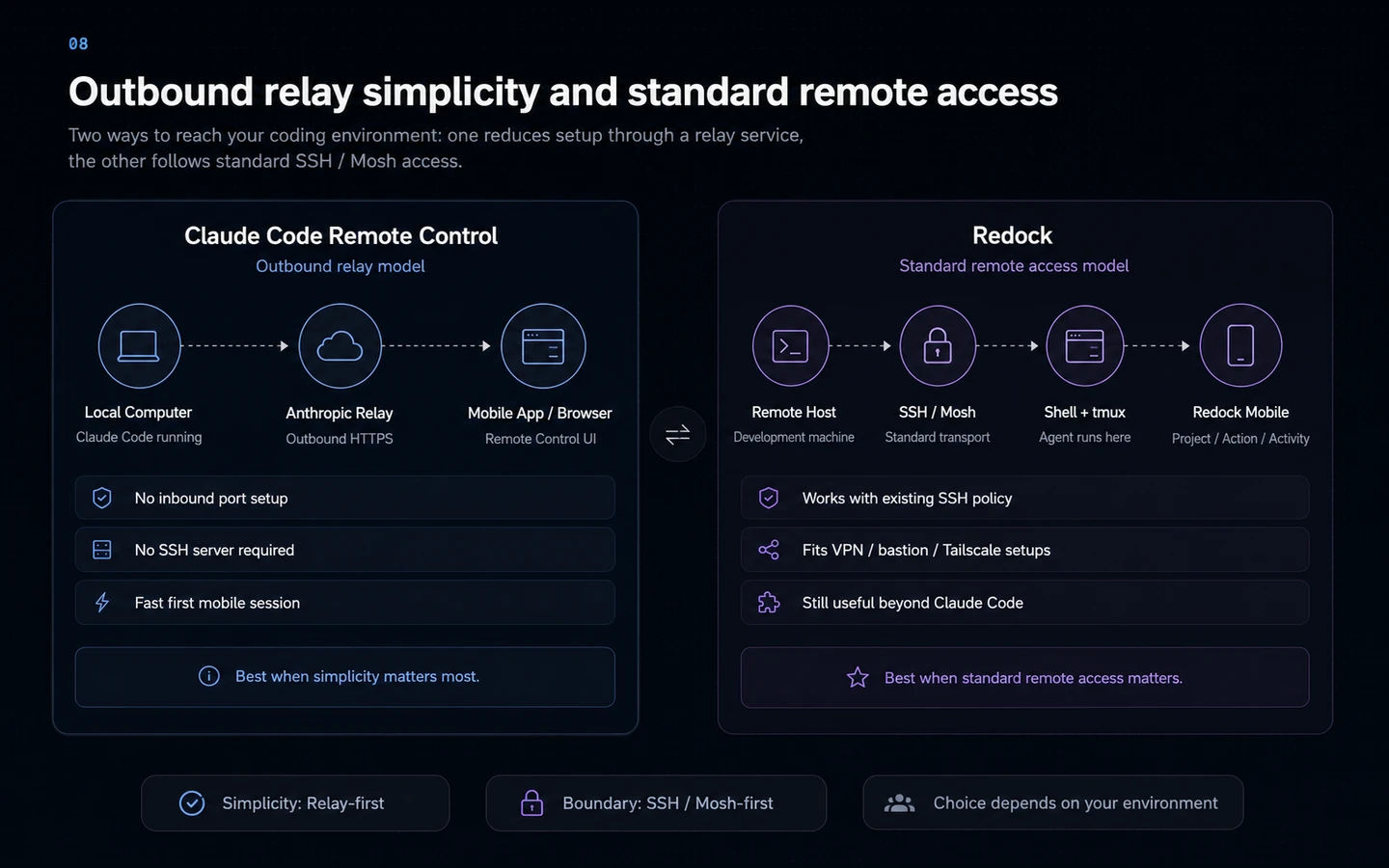
Remote Control makes outbound HTTPS requests and does not open an inbound port. The Claude app or browser connects through Anthropic’s service using short-lived credentials, so there is no SSH server, VPN, port forwarding, or Mosh setup before the first mobile session.
Redock uses SSH or Mosh. That setup is more work, but follows a standard boundary that can sit behind Tailscale, a corporate VPN, a bastion, or existing SSH policy. The same connection remains useful even when Claude Code is not running.
Remote Control depends on a signed-in Claude account and eligible organization policy; Redock depends on careful SSH key and network management.
09
Claude session continuity and terminal session continuity solve different problems
Remote Control keeps the Claude Code conversation synchronized across terminal, web, and mobile. It reconnects after brief interruptions when the host returns, but the local Claude Code process must keep running.
Redock puts durability one layer lower in tmux. The tmux session can contain Claude Code or any other process and remains attachable from Redock, a desktop terminal, or another SSH client. Mosh can additionally tolerate roaming networks.
Claude Code continuity is more legible because the client understands the conversation. tmux continuity is more general because it preserves the entire terminal environment.
10
Remote conversations versus reusable workflow controls
Remote Control is excellent at continuing a Claude Code conversation and approving the next decision. Its organizing object remains a Claude Code session.
Redock Projects remember a Host and repository directory regardless of the agent. Actions give deterministic tasks such as tests, builds, migrations, deployments, or log tails a named control. Quick and background Actions create Runs with status and output in Activity.
A canonical test or deployment script is often safer and faster as an exact Action than as another prompt asking the agent to recall the procedure.
11
The honest choice follows your agent boundary
Claude Code Remote Control is stronger when Claude Code is the center of the workflow, the official mobile conversation is desirable, and avoiding SSH or VPN setup matters.
Redock is stronger when a phone must control the complete development environment. Agent switching, arbitrary shell access, explicit tmux recovery, reusable Actions, saved Runs, and Project context are its reasons to exist.
The products can also coexist: Remote Control for the clearest Claude Code conversation, and Redock for emergency shell access, other agents, deterministic commands, and tmux sessions.
12
Who should choose which?
Choose Redock if…
- You need a full shell rather than a Claude-only remote interface.
- You switch between multiple coding agents and ordinary terminal tools.
- You want Projects, named Actions, saved Runs, and Activity.
- You want standard SSH/Mosh connectivity and tmux portability.
Choose Claude Code Remote Control if…
- Claude Code is your primary or only coding agent.
- You want the official Claude conversation and approval interface.
- You want local MCP servers and project configuration without SSH setup.
- You want terminal, browser, and phone messages to stay synchronized.
13
The bottom line
Redock fits developers who want a terminal-grounded AI workflow with Projects, Actions, Runs, and tmux continuity. Claude Code Remote Control fits developers whose daily work depends more on its documented strengths. The right choice is the one that removes more friction from the work you actually repeat.
14
Frequently asked questions
Does Remote Control move my repository to the cloud?
No. Claude Code continues to execute on your machine and uses its local filesystem, tools, MCP servers, and project configuration. The mobile app is a remote interface to that process.
Do I need SSH for Remote Control?
No. It uses outbound HTTPS through Anthropic’s service. Redock uses SSH or Mosh because it exposes a general remote terminal.
Can Remote Control run Codex or OpenCode?
No. Remote Control is a Claude Code feature. Redock can run multiple terminal-based agents installed on the host.
What happens if the host sleeps or loses its network?
Remote Control attempts to reconnect when the machine returns, but the Claude Code process must keep running and extended outages can end a session.
Can I use both?
Yes. Remote Control can be the native Claude surface, while Redock remains the full terminal and cross-agent workflow.
Sources and further reading
Try the workflow
Keep the coding session moving from anywhere.
Connect your development machine, resume the agent, send the next task, and review the result from Redock.